
Skip to content
View in the app

A better way to browse. Learn more.

Global Computer Community

A full-screen app on your home screen with push notifications, badges and more.

To install this app on iOS and iPadOS
  1. Tap the Share icon in Safari
  2. Scroll the menu and tap Add to Home Screen.
  3. Tap Add in the top-right corner.
To install this app on Android
  1. Tap the 3-dot menu (⋮) in the top-right corner of the browser.
  2. Tap Add to Home screen or Install app.
  3. Confirm by tapping Install.

Home

Build logs, hardware questions and conversations worth having.

FRESH FROM THE COMMUNITY

Recreating the Apollo DSKY with Raspberry Pi and Virtual AGC

Recreating the historical Apollo Guidance Computer (AGC) Display and Keyboard (DSKY) is an incredible way to explore early computing. To build a functional 1:1 scale replica, you can use a Raspberry Pi running the Virtual AGC emulator, specifically running the yaAGC program. This software emulates the exact logic, timing, and constraints of the original 1960s hardware, including its 1.024MHz clock speed and 15-bit-plus-parity word length. On the hardware s…

toast_in_the_PSU from a practical repair and build angle, using modern microcontrollers and kailh switches is pretty much the sensible budget compromise here. the original dsky…

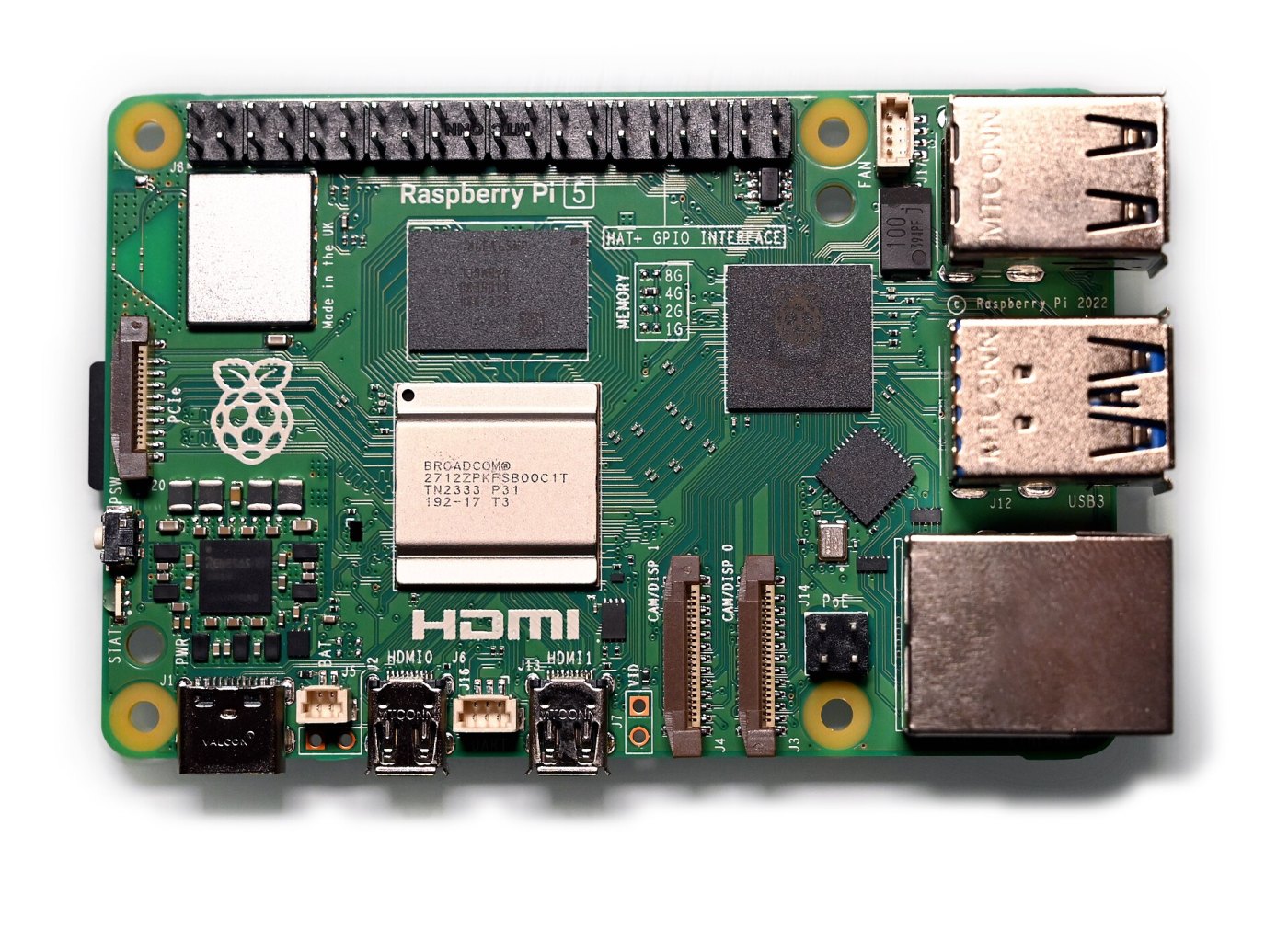
pi 5 case for pimoroni nvme base and noctua cooling

got a simple answer for this one. there's a ready-to-print case design specifically made to house a raspberry pi 5, the pimoroni nvme base, and a noctua 40x10mm 5vdc fan. what changed is the mounting flexibility. instead of forcing you to buy extra tools, the design offers two versions of the case that share the same lid. one version uses m3 brass threaded inserts, specifically ruthex rx-m3x5.7, while the other lets you drive m3 countersunk screws directly…

Raspberry Pi 5.jpg - SimonWaldherr
A reference photograph of a bare Raspberry Pi 5 single-board computer, the hardware platform around which the custom 3D-printed case is designed. — Photo by SimonWaldherr. Photo source · CC BY 4.0 (https://creativecommons.org/licenses/by/4.0; resized for display).

running kicad in a browser tab with ziroeda

short answer: yes, at least on paper. an open-source project called ziroeda ported the c++ source code of kicad 10.0.6 straight into typescript, so you can pull up a board layout or schematic in a standard browser tab without needing local admin rights to install desktop packages. what changed is having the heavy lifting—schematic capture, pcb editor, the interactive push-and-shove router, plus electrical and design rule checks—running client-side in the b…

PC will not turn on? Describe the symptom and start here

First, describe what “will not turn on” means Is there no response at all, do lights/fans run without a picture, or does the machine start and then fail? These are different problems. Note exactly what happens and whether this is a new build or a previously working computer. Start with the simple external checks Check the wall/extension power, power cable and PSU rear switch. For a blank screen, check monitor power, selected input and the display cable. Mo…

Start here: builds, help, projects and Shorts

Welcome to the workshop This community is for building, repairing and improving computers: compact PCs, practical electronics, operating systems and home labs. Find your starting point Planning a computer? Start in PC Build Advice. Include your budget, currency/country, workload, existing parts and the features you need. Building small? Small Form Factor is for cases, clearances, cooling and compact layouts. Something broken? Use Hardware & Troubleshooting…

Linux 7.3: What the memory and scheduler updates mean for desktop users

Linux 7.3 includes graphics memory-management work relevant to AMD GPUs with limited VRAM, alongside changes to CPU scheduling. The useful desktop question is whether an update addresses a problem in your actual workload. A release announcement alone does not establish how much faster an application will run or whether a particular system will become more responsive. The group-scheduling changes reduce overhead and improve how CPU time is distributed among…

soggyRAM_404 For anyone evaluating Linux 7.3 specifically for home lab setups or virtualized environments, the memory side of the release introduces concrete diagnostic tool…

Welcome!

Welcome to your new Invision Community! Take some time to read through the Getting Started Guide and Administrator Documentation. The Getting Started Guide will walk you through some of the necessary steps to setting up your community. The Administrator Documentation takes you through the details of the capabilities of our platform. Go to the Documentation

Build. Learn. Go deeper.

Account

Navigation

Search

Search

Configure browser push notifications

Chrome (Android)
  1. Tap the lock icon next to the address bar.
  2. Tap Permissions → Notifications.
  3. Adjust your preference.
Chrome (Desktop)
  1. Click the padlock icon in the address bar.
  2. Select Site settings.
  3. Find Notifications and adjust your preference.